
Elapsed time is intended to let the employee know how long they have been working based on their last known clock in based on information from ExakTime Mobile or Connect (depending on internet connection). If the employee forgets to clock out, the elapsed time will continue to tick up until they are clocked out or clocked in again.
The number of hours/minutes shown in an employee's "Elapsed Time" may not be the number of hours/minutes that they will receive on their time card.
- The administrator is still able to edit/enter the employee's clock out time on ExakTime Connect.
- The time card time entry settings can prevent an employee's time card from accepting hours that go over a certain threshold by splitting the start and stop punches into two different lines. For more information regarding this setting, please refer to the following article: Time Card Time Entry Settings
Example
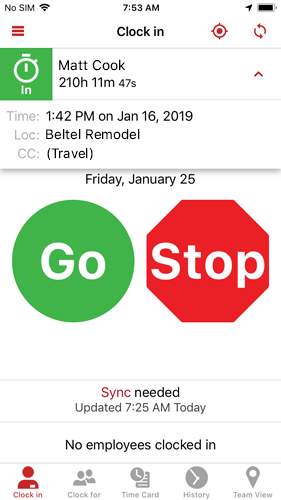
Our employee last worked on January 16th, took a vacation, and returned to work on January 25th. He had forgotten to clock out on January 16th and the elapsed time kept going "up" as nobody had clocked him out (through ExakTime Connect or Mobile).
If the employee were to clock in/out on January 25th, their time card would not show that they have received 210 hours, but would instead split the time record into two separate lines as it would exceed the threshold for the "Time Card Time Entry" setting. The administrator has the opportunity to manually correct the employee's time card.